
Encontrar

Pregunta
· 15 jul, 2024

General Logging In ObjectScript Classes (forDebugging)

I am trying to log certain program data in my ObjectScript REST class, to track down a bug I have. I am comparing two values at runtime, and one result does one thing, and another a different thing. Since this is a REST API class, I have no way of seeing in real time what the value is to debug. I cannot simply run the method in debug in Studio as it will not run properly being a REST class method, nor have the correct incoming header data to correctly replicate what is happening in the API at runtime when being hit by client apps. In other languages like C# or Java, when I would debug an API method like this, I would put in a line like
logger.Log("debug", {string containing any useful info for debugging the problem}...)
and then hit my services with the client app, run the scenario in question, and then check the logs and see what happened. I cannot figure out how to do this in ObjectScript. I've looked in the documentation for Logging, and all I've found so far are exception logging references, which is not what I'm after. Is there any way to do what I'm trying to do in ObjectScript classes?

6 comentarios
Comentarios (6)6
Inicie sesión o regístrese para continuar
Anuncio
· 15 jul, 2024

Technology Bonuses for the InterSystems Python Contest 2024

Hi Developers!

Here are the technology bonuses for the InterSystems Python Contest 2024 that will give you extra points in the voting:

  • IRIS Vector Search usage - 3
  • Python Pex Interoperability - 3
  • Python in BPL - 2
  • WSGI Web Apps - 2
  • Python libs: sqlalchemy and dbt - 2
  • LLM AI or LangChain usage: Chat GPT, Bard and others - 3
  • NoObjectScriptLine - 3
  • Hugginface - 2
  • Docker container usage - 2 
  • ZPM Package deployment - 2
  • Online Demo - 2
  • Implement InterSystems Community Idea - 4
  • Find a bug in Embedded Python - 2
  • First Article on Developer Community - 2
  • Second Article On DC - 1
  • First Time Contribution - 3
  • Video on YouTube - 3
  • YouTube Short - 1

See the details below.<--break-><--break->

IRIS Vector Search - 3 points

Starting from 2024.1 release InterSystems IRIS contains a new technology vector search that allows to build vectors over InterSystems IRIS data and perform search of already indexed vectors. Use it in your solution and collect 5 bonus points. Here is the demo project that leverages it.

Python Pex Interoperability - 3 points

InterSystems IRIS has Python Pex Interoperability module that provides the option to develop InterSystems Interoperability productions from Python. Use it and collect 3 extra points for your application. It's OK also to use alternative python.pex wheel introduced by Guillaume Ronguier in this project and template.

Python in BPL - 2 points

While building IRIS Interoperability productions it is possible to code BPL in with python now. Use it in your application and collect 2 extra bonus points! See the release notes. Example.

WSGI Web Apps - 2 points

The 2024.1 InterSystems IRIS release goes with an experimental feuture that allows to deploy WSGI Web Apps for IRIS. Take a look at three example applications for flask, fast-api and django to deploy IRIS apps with WSGI support.

Python libs: sqlalchemy and dbt - 2

Use sqlachemy and dbt for IRIS community libs and collect 2 additional bonus points for each.

LLM AI or LangChain usage: Chat GPT, Bard and others - 3 points

Collect 6 bonus expert points for building a solution that uses LangChain libs or Large Language Models (LLM) such as ChatGPT, Bard and other AI engines like PaLMLLaMA and more. AutoGPT usage counts too.

A few examples already could be found in Open Exchange: iris-openai, chatGPT telegram bot.

Here is an article with langchain usage example.

Pure Python(NoObjectScriptLine) - 3 points

We are introducing several python APIs in this contest! And the bonus is yet another challenge: build your python solution with InterSystems IRIS and try to avoid using even a line of ObjectScript! IRIS Classes with only Embedded Python methods are OK though. Do it and collect 4 bonus points more!

Here is a template that demonstrates how you can use IRIS without a line of ObjectScript. Yes, it contains ObjectScript classes for demo purpose but you can delete it in your app.

HuggingFace - 2

Deploy your solution at the hugging face repository and collect 2 extra points. Example.

Docker container usage - 2 points

The application gets a 'Docker container' bonus if it uses InterSystems IRIS  running in a docker container. Here is the simplest template to start from.

ZPM Package deployment - 2 points

You can collect the bonus if you build and publish the ZPM(InterSystems Package Manager) package for your Full-Stack application so it could be deployed with:

zpm "install your-multi-model-solution"

command on IRIS with ZPM client installed. 

ZPM client. Documentation.

Online Demo of your project - 2 points
Collect 2 more bonus points if you provision your project to the cloud as an online demo. You can do it on your own or you can use this template - here is an Example. Here is the video on how to use it.

Implement Community Opportunity Idea - 4 points

Implement any idea from the InterSystems Community Ideas portal which has the "Community Opportunity" status. This will give you 4 additional bonus points.

Find a bug in Embedded Python - 2 points
We want the broader adoption of InterSystems Embedded python, so we encourage you to report the bugs you will face during the development of your python application with IRIS in order to fix it. Please submit the bug here in a form of issue and how to reproduce it. You can collect 2 bonus points for the first reproducible bug.

Article on Developer Community - 2 points

Write a brand new article on Developer Community that describes the features of your project and how to work with it. Collect 2 points for the article. 
*This bonus is subject to the discretion of the experts whose decision is final.

The Second article on Developer Community - 1 point

You can collect one more bonus point for the second article or the translation of the first article. The second article should go into detail of a feature of your project. The 3rd and more articles will not bring more points, but the attention will be all yours. 
*This bonus is subject to the discretion of the experts whose decision is final.

First Time Contribution - 3 points

Collect 3 bonus points if you participate in InterSystems Open Exchange contests for the first time!

Video on YouTube - 3 points

Make the Youtube video demonstrating your product in action and collect 3 bonus points each.

YouTube Short - 1 point

Make a YouTube Short demonstrating your product in action and collect 1 bonus point each.

The list of bonuses is subject to change. Stay tuned!

Good luck in the competition!
Comentarios (0)1
Inicie sesión o regístrese para continuar
Pregunta
· 15 jul, 2024

Setting EnsLib.SQL.Snapshot = "" vs EnsLib.SQL.Snapshot.Clean()

In tracking down some of our Orphaned message issues, I was wondering if setting our EnsLib.SQL.Snapshot variable equal to "" was the same as calling the .Clean() method on EnsLib.SQL.Snapshot? Are they the same?

should I be possibly using ##class(EnsLib.SQL.Snapshot).%Delete() instead?

2 comentarios
Comentarios (2)1
Inicie sesión o regístrese para continuar
Artículo
· 10 jul, 2024 Lectura de 5 min

IRISでシャドウイングの代わりにミラーリングを構成する方法-プログラム編

これは InterSystems FAQ サイトの記事です。
 

こちらの記事では、「IRISでシャドウイングの代わりにミラーリングを構成する方法」を紹介しました。

今回は、「プログラムでシャドウイングの代わりにミラーリングを構成する方法(Windows版)」を紹介します。


【今回のサンプル・ミラー構成について】

  正サーバ(ミラー・プライマリ) 副サーバ(ミラー・非同期)
ミラー名 MIRRORSET MIRRORSET
ミラーメンバ名 MACHINEA MACHINEC
IPアドレス 35.77.84.159 54.248.39.237


では、ミラーの構成手順をご紹介します。手順は以下になります。
 

<ミラーリングのプライマリ設定>     // MACHINEA(正サーバ)

1. ISCAgentの自動起動設定および起動         ※Windowsコマンドプロンプトで実行

C:\Users\Administrator>sc config ISCAgent start=auto
C:\Users\Administrator>sc start ISCAgent


2. [システム管理] > [構成] > [ミラーサービスの有効化]     ※IRISターミナルで実行

zn "%SYS"
set status=##class(Security.Services).Get("%Service_Mirror", .svcProps)
set svcProps("Enabled") = 1
set status=##class(Security.Services).Modify("%Service_Mirror", .svcProps)


3. [システム管理] > [構成] > [ミラーの作成]     ※IRISターミナルで実行

zn "%SYS"
set MirrorSetName="MIRRORSET"
set SystemName = "MIRRORA"     // 任意で設定。設定しない場合、既定で$sysytem 変数の内容を利用(例:<デバイス名>/IRIS)
set MirrorInfo("UseSSL") = 0
set MirrorInfo("ECPAddress") = "xxx.xxx.xxx.xxx"      // this is the SuperServer Address, default value is result of $System.INetInfo.LocalHostName().
set sc = ##class(SYS.Mirror).CreateNewMirrorSet(MirrorSetName, SystemName, .MirrorInfo)
write $system.Mirror.GetMemberType()
// (出力) Failover
write $system.Mirror.GetStatus()
// (出力) PRIMARY、TRANSITIONの場合は少し待って再度実行


4. ローカルデータベースの作成(ミラー属性の追加)     ※IRISターミナルで実行

zn "%SYS"
/// ローカルデータベースの作成
Set Directory="c:\intersystems\iris\mgr\mirrordb\"
Set x=$ZF(-100, "/shell", "mkdir", Directory)
Set db=##Class(SYS.Database).%New()
Set db.Directory=Directory
Set status=db.%Save()
Set DBName="MIRRORDB"
Set status=##class(Config.Configuration).AddDatabase(DBName,Directory)
Set NSName=DBName
Set status=##class(Config.Configuration).AddNamespace(NSName,DBName)

/// ミラー属性の追加(プライマリフェイルオーバーメンバのみ)
set status=##class(SYS.Mirror).AddDatabase(Directory)
set db=##Class(SYS.Database).%OpenId(Directory)
write db.Mirrored
// (出力) 1           ; Mirror DB の場合1
kill


<ミラーリングのDR非同期設定>     // MACHINEC(副サーバ)

1. ISCAgentの自動起動設定および起動         ※Windowsコマンドプロンプトで実行

C:\Users\Administrator>sc config ISCAgent start=auto
C:\Users\Administrator>sc start ISCAgent


2. ミラーサービスの有効化
 *[システム管理] > [構成] > [ミラーサービスの有効化]     ※IRISターミナルで実行

zn "%SYS"
set status=##class(Security.Services).Get("%Service_Mirror", .svcProps)
set svcProps("Enabled") = 1
set status=##class(Security.Services).Modify("%Service_Mirror", .svcProps)


3. 非同期としてミラーに参加
 *[システム管理] > [構成] > [非同期として参加]     ※IRISターミナルで実行

zn "%SYS"
set MirrorSetName="MIRRORSET"
set InstanceName="IRIS"            // primary instanace name
set AgentAddress="xxx.xxx.xxx.xxx" // primary member DNS name or IPaddress
set AsyncMemberType=0              // DR:0, Reporting R only:1, Reporting R/W:2
set SystemName = "MIRRORC"         // 任意で設定。設定しない場合、既定で$sysytem 変数の内容を利用
set LocalInfo("ECPAddress") = "yyy.yyy.yyy.yyy" // this is the SuperServer Address, default value is result of $System.INetInfo.LocalHostName().
set status=##class(SYS.Mirror).JoinMirrorAsAsyncMember(MirrorSetName,SystemName  ,InstanceName,AgentAddress,,AsyncMemberType,.LocalInfo)
write $system.Mirror.GetMemberType()
// (出力) Disaster Recovery
write $system.Mirror.GetStatus()
// (出力) CONNECTED、TRANSITIONの場合は少し待って再度実行


4. ミラーデータベースの準備

非同期の副サーバ:MACHINEC に、正サーバ:MACHINEA のバックアップファイルをリストアします。

【補足】
データベースファイル(IRIS.DAT)のコピーによるバックアップの場合は(=正サーバで Backup.Generalクラスの ExternalFreeze()/ExternalThaw() を利用してバックアップを取っている場合)、非同期データベースをディスマンとした状態でデータベースファイル(IRIS.DAT)を置換します。

※ローカルデータベースの作成手順は、正サーバ:MACHINEAと同じです。
  (4の「ローカルデータベースの作成」、ミラー属性の追加 以外を行います)

※外部/オンラインバックアップ・リストアについては、以下の記事で詳細手順を説明していますので、参考になさってください。
外部バックアップについて
オンラインバックアップについて


5. ミラーモニターでのジャーナルの有効化、キャッチアップ     ※IRISターミナルで実行

zn "%SYS"
set Directory="c:\intersystems\iris\mgr\mirrordb\"
set status=##class(SYS.Mirror).ActivateMirroredDatabase(Directory)  // 有効化
set db=##class(SYS.Database).%OpenId(Directory)
set sfn= db.SFN  // sfn system file number データベーステーブル(内部情報)内の番号
kill db
set status=##class(SYS.Mirror).CatchupDB($lb(sfn))  // キャッチアップ
write status     // 1 でキャッチアップ成功。それ以外の場合は write $SYSTEM.Status.DisplayError(status) でエラーの内容を確認


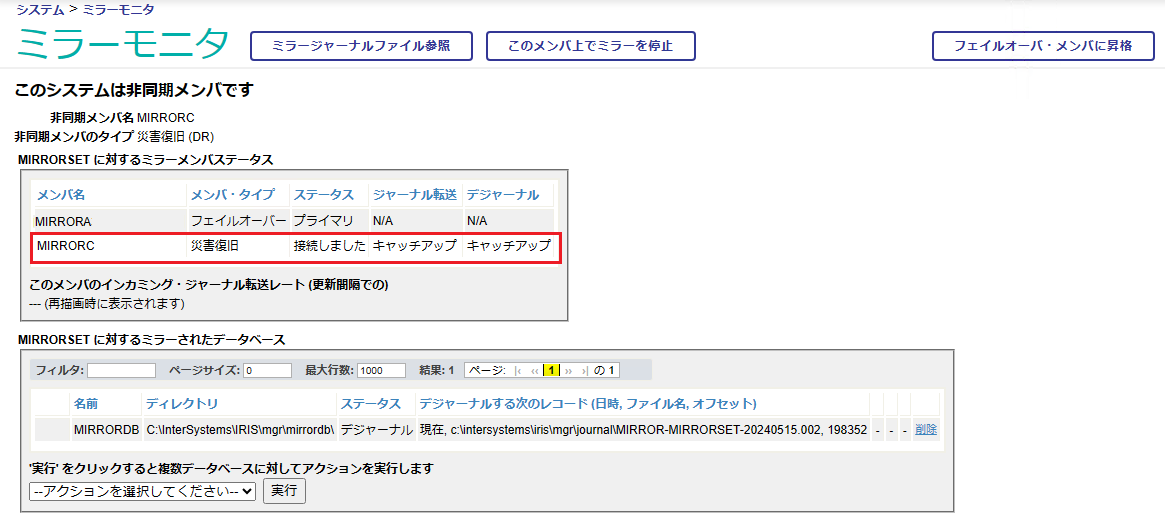
6. 管理ポータルで、キャッチアップしたことを確認(こちらで構成は終了です)
 *[システムオペレーション] > [ミラーモニタ]


各種設定の詳細は以下のドキュメントをご覧ください。
Security.Services
SYS.Mirror
$SYSTEM.Mirror


enlightened【ご参考】
Cache Mirroring 101:簡単なガイドとよくある質問  
ミラーリングの機能について
ミラージャーナルファイルの削除のタイミングと要件
IRISでシャドウイングの代わりにミラーリングを構成する方法

Comentarios (0)0
Inicie sesión o regístrese para continuar
InterSystems Official
· 9 jul, 2024

Git-source-control launches release 2.4.0 with a new basic mode

The Application Services team is pleased to announce the release of git-source-control version 2.4.0, introducing several new features to the open-source project.

For those unfamiliar, git-source-control is an embedded (or "server-side") source control tool for InterSystems products, installed through the InterSystems Package Manager.


Here are the key additions to the 2.4.0 release:

  1. Basic Mode

Basic mode presents an overall great simplification to the git workflow, suitable for users with less knowledge of git as a source control tool. The basic mode has been explicitly developed for the feature branch and trunk-based models of development.

In basic mode, the typical flow of staging, committing, pulling and then pushing has been enveloped in a 'Sync' operation. Users need only choose the 'Sync' operation from the menu, and their local changes will automatically be synchronized with the corresponding branch in the remote repository (on GitHub, GitLab, etc.).

To enable basic mode, simply navigate to the 'Settings' page of the git-source-control tool, either through the embedded menu or the web UI, and select the 'Use Basic Mode' option in the user settings at the bottom of the page.

        2. Revamped Workspace UI

The workspace section of the git-source-control Web UI provides an area for users to take actions on changes to their repository.

Previously, it was divided into four segments, a diff view, a working copy view, a commit message view and a staging area.


With the new workspace view, the working copy and staging area have been collapsed into a single list of files with checkboxes, and it's clearer that the commit message is a text field. The diff view has been enhanced, allowing uncommitted files from other IRIS users to be viewed in the diff view, which previously was not supported. We believe these changes make the user interface much more intuitive.


          3. Default Merge Branch

In basic mode, a new setting for the 'default merge branch' allows users to specify a branch whose remote copy will be merged into the current branch before pushing to the remote repository.

This setting was implemented to provide additional built-in support for the trunk-based source control approach. Merging with this option will also automatically resolve a common class of merge conflict that occurs when multiple developers are working on the same IRIS Interoperability production.


Notable Bug Fixes:

            1. Git commands changing local repository files now synchronize with IRIS

Previously, the checkout, merge, rebase, stash and discard operations did not have their changes to the local file tree reflected by IRIS. Now, upon any of these commands being run, IRIS will update to provide file versions that match the local repository, including deleting files that don't exist in the current branch, or adding files that only exist in the current branch. This also compiles the changed files, which is especially important for changes to interoperability productions to reflect in the Production Configuration page.

             2. Deleted files are now shown in the Workspace UI

Previously, files deleted in the repository would not show up as one of the changes in the workspace. This meant that deletions would go unstaged and uncommitted, leaving the deleted files lingering in the repository. In the new UI, not only do all types of file changes (including deletions) show in the workspace, but the files are also listed with the corresponding git action, such as "modified", "added", "deleted" or "renamed."


              3. Users with %Developer are now able to perform all actions though the package without the need for added roles

In some cases, users were unable to perform many of the package's operations with being granted additional SQL privileges. This is no longer the case, simplifying security configuration.


For a full list of features and bug fixes introduced by the 2.4.0 release, please see the changelog.md file in the git-source-control repository on GitHub.

We are always looking for feedback and improvements for the git-source-control tool! Please feel free to create a GitHub issue in the repository if you encounter a bug or think an important feature is missing.

1 Comentario
Comentarios (1)1
Inicie sesión o regístrese para continuar