Nueva publicación

Rechercher

Artículo
· 23 ene, 2026 Lectura de 2 min

DifyのベクトルストアにIRISを追加しました

DifyのベクトルストアにIRISを追加しました

こんにちは、セールスエンジニアの奥山です。

OSSのLLMアプリ開発プラットフォーム「Dify」に、IRISをベクトルストアとして利用できる機能をコントリビュートしました。Dify 1.11.2でマージされています。

https://github.com/langgenius/dify/releases/tag/1.11.2

Difyとは

Difyは、RAGやAIエージェントをノーコード/ローコードで構築できるOSSプラットフォームです。
GitHub Stars 10万以上、世界中で急速に利用が広がっています。

https://github.com/langgenius/dify

これまでWeaviate、Qdrant、Milvus、PgVector等のベクトルDBに対応していましたが、
今回IRISが選択肢に加わりました。

Comentarios (0)1
Inicie sesión o regístrese para continuar
Artículo
· 23 ene, 2026 Lectura de 2 min

DBサイズを拡張する方法

これは InterSystems FAQ サイトの記事です。

こちらの記事では、データベースサイズを拡張する方法をご紹介します。


1.今すぐ拡張したい場合

2.空き容量がなくなったときに、拡張するサイズを設定したい場合


1.今すぐ拡張したい場合

管理ポータル、またはコマンドで、拡張したいサイズにデータベースサイズを指定します。

管理ポータル:
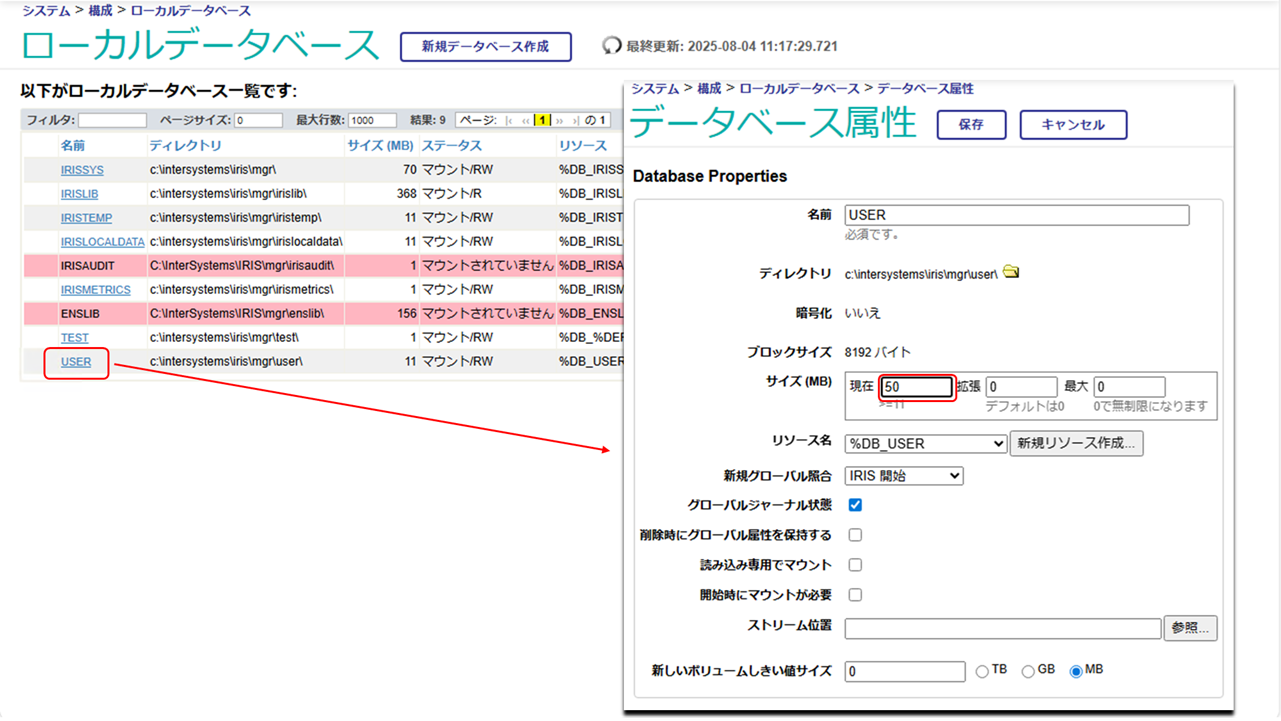
[システム管理] > [構成] > [システム構成] > [ローカルデータベース]

対象のデータベースを選択し、データベース属性のダイアログで、「現在」に拡張したいサイズ(拡張後のサイズ)を指定します。
保存クリック後、即座にデータベースは拡張されます。


上記例は、もともと11MBだったサイズを50MBに拡張、つまり39MB拡張したため、messages.logには以下のようなログが記録されます。

08/04/25-11:27:01:333 (3468) 0 [Database.StartExpansion] Starting Expansion for database c:\intersystems\iris\mgr\user\. 39 MB requested.
08/04/25-11:27:01:424 (3468) 0 [Database.FullExpansion] Expansion completed for database c:\intersystems\iris\mgr\user\. Expanded by 39 MB.


コマンドで行う場合は、以下のようにします。

// %SYSネームスペースに移動します
Set $Namespace="%SYS"
// 設定を変更するデータベースのディレクトリを設定します
Set Directory="C:\InterSystems\IRIS\mgr\user"
Set db=##Class(SYS.Database).%OpenId(Directory)

//サイズを拡張するので、Sizeプロパティを設定して保存します
Set db.Size=100
Set status=db.%Save()


2.空き容量がなくなったときに、拡張するサイズを設定したい場合

データベースファイルの拡張は、そのデータベースに空きブロックがなく、新規ブロックの確保が必要な更新が発生した際に行われます。
既定 (推奨) の設定であるゼロ (0) は、現在のサイズの 12% または 10 MB のいずれか大きいサイズに拡張を行います。
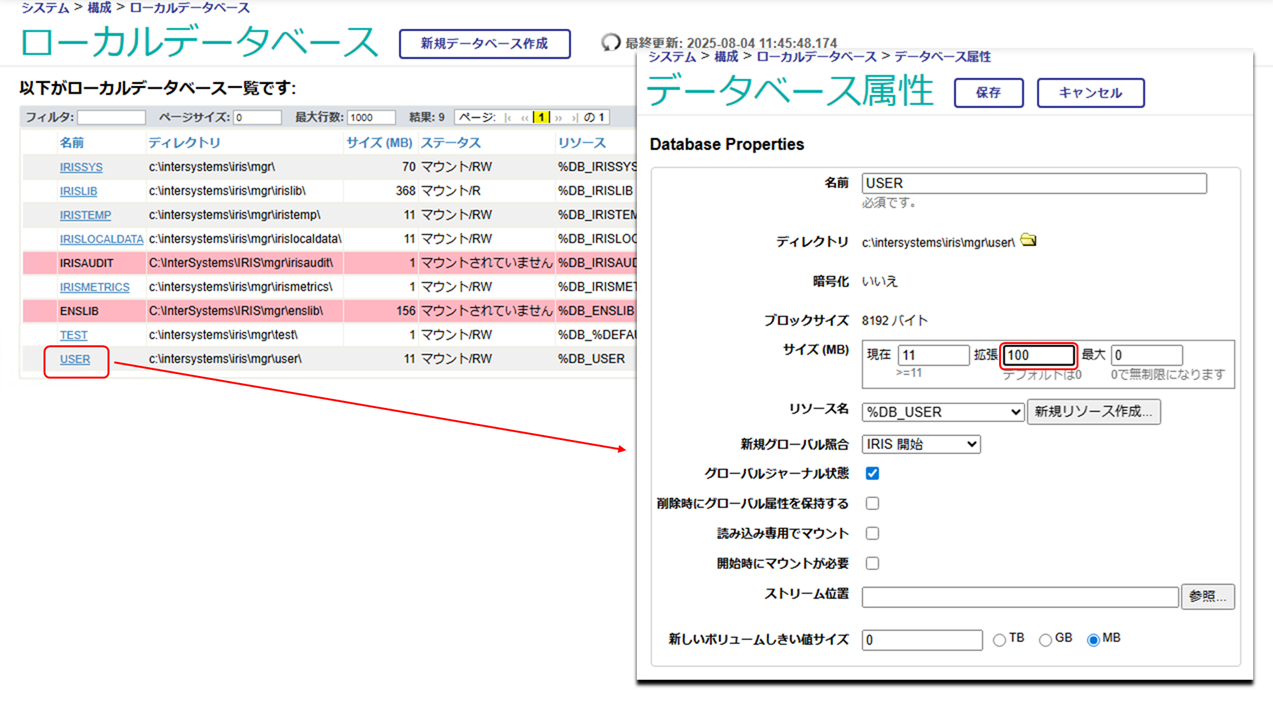
任意の値を指定したい場合は、管理ポータル、またはコマンドで、データベースの拡張サイズを指定します。
次回拡張時に、指定したサイズに拡張されます。

管理ポータル:
[システム管理] > [構成] > [システム構成] > [ローカルデータベース]


コマンドで行う場合は、以下のようにします。

// %SYSネームスペースに移動します
Set $Namespace="%SYS"
// 設定を変更するデータベースのディレクトリを設定します
Set Directory="C:\InterSystems\IRIS\mgr\user"
Set db=##Class(SYS.Database).%OpenId(Directory)

//拡張サイズ(ExpansionSize)の変更を行います(MB)
Set db.ExpansionSize = 100
Set status=db.%Save()
Comentarios (0)0
Inicie sesión o regístrese para continuar
Artículo
· 23 ene, 2026 Lectura de 2 min

Fichiers temporaires et singletons : Nettoyage après utilisation

J'ai rencontré à plusieurs reprises un cas où j'ai besoin d'utiliser un fichier/dossier temporaire et de le supprimer ultérieurement.

La solution la plus naturelle consiste alors à suivre les recommandations de "Robust Error Handling and Cleanup in ObjectScript" avec un bloc try/catch/pseudo-finally ou un objet enregistré pour gérer le nettoyage dans le destructeur. %Stream.File* possède également une propriété RemoveOnClose que vous pouvez définir, mais avec précaution, car vous pourriez supprimer accidentellement un fichier important. De plus, cette propriété est réinitialisée par les appels à %Save(), vous devrez donc la remettre à 1 après chaque utilisation.

Il existe cependant un cas particulier : supposons que vous ayez besoin que le fichier temporaire subsiste dans la pile d'exécution. Par exemple :

ClassMethod MethodA()
{
    Do ..MethodB(.filename)
    // Do something else with the filename
}

ClassMethod MethodB(Output filename)
{
    // Create a temp file and set filename to the file's name
    Set filename = ##class(%Library.File).TempFilename()
    
    //... and probably do some other stuff
}

Vous pourriez toujours manipuler des objets %Stream.File* avec RemoveOnClose défini sur 1, mais nous nous intéressons ici uniquement aux fichiers temporaires.

C'est là qu'intervient le concept de « Singleton ». IPM propose une implémentation de base dans %IPM.General.Singleton, que vous pouvez étendre pour répondre à différents cas d'utilisation. Le comportement général et le modèle d'utilisation sont les suivants :

  • À un niveau de pile supérieur, appelez %Get() sur cette classe pour obtenir l'unique instance, également accessible par des appels à %Get() à des niveaux de pile inférieurs.
  • Lorsque l'objet sort de la portée au niveau de pile le plus élevé qui l'utilise, le code de nettoyage est exécuté.

Cette méthode est plus performante qu'une variable `%` car il n'est pas nécessaire de vérifier sa définition, et elle survit également aux appels NEW sans argument aux niveaux de pile inférieurs grâce à une astuce de manipulation d'objets plus profonde.

Concernant les fichiers temporaires, IPM propose également un singleton pour la gestion des fichiers temporaires. Appliquée à ce problème, la solution est la suivante :

ClassMethod MethodA()
{
    Set tempFileManager = ##class(%IPM.Utils.TempFileManager).%Get()
    Do ..MethodB(.filename)
    // Do something else with the filename
    // The temp file is cleaned up automatically when tempFileManager goes out of scope
}

ClassMethod MethodB(Output filename)
{
    Set tempFileManager = ##class(%IPM.Utils.TempFileManager).%Get()
    // Create a temp file and set filename to the file's name
    Set filename = tempFileManager.GetTempFileName(".md")
    
    //... and probably do some other stuff
}
Comentarios (0)1
Inicie sesión o regístrese para continuar
Pregunta
· 22 ene, 2026

Email Recipients versus Alert Groups dropdown option

Hi, I have simple email alert setup (EnsLib.EMail.AlertOperation) where in operations I have SMTP server setup and Recipients emails.

Also I find Alert Groups dropdown option in operations, processes, how this is different from setting up simple email alert with recipients list?

Please advise.

1 Comentario
Comentarios (1)2
Inicie sesión o regístrese para continuar
Comentarios (2)3
Inicie sesión o regístrese para continuar