
Encontrar

Pregunta
· 19 ago, 2024

Question about PKI Configuration

Hello everyone,

I'm currently working on getting familiar with OAuth2, following this article. Since Part 2 involves using PKI, I decided to implement it as outlined in the article. However, I've run into an issue that I can't seem to resolve, and my searches on Google haven't yielded any useful results.

Here's a brief overview of what I've done so far:

Configuring the PKI Server:

  • Navigated to: System Administration > Security > Public Key Infrastructure > Configure Local Certificate Authority Server.
  • Filled in all the required fields and saved the configuration.

As far as I can tell, this step was successful. The following three files were generated, and the message displayed was:

"Certificate Authority server successfully configured. Using existing files: D:\CacheSys\mgr\root_ca.cer, .key, and .srl."

Configuring the PKI Client:

  • Navigated to: System Administration > Security > Public Key Infrastructure > Configure Local Certificate Authority Client.
  • Again, I filled in all the necessary fields and saved the configuration.


This also seemed to work fine. The message after saving was:

"Certificate Authority client successfully configured."

Submitting a Certificate Signing Request:

  • Navigated to: System Administration > Security > Public Key Infrastructure > Submit Certificate Signing Request to Certificate Authority Server.
  • Filled in all the required fields and saved the configuration.

However, now I'm seeing the following error message:

"ERROR #5002: ObjectScript Error: <WRITE>Send+122^%Net.HttpRequest.1"


The auth.csr and auth.key were nevertheless created.

I’m not sure how to interpret this error message. If anyone has any insight into what might be missing or where the problem lies, I would greatly appreciate your help.

maybe also important:

Below are the SSL settings for the CA Test Server:


Thank you in advance for your assistance.

Best regards,
Daniel Goerke

1 Comentario
Comentarios (1)2
Inicie sesión o regístrese para continuar
Pregunta
· 18 ago, 2024

Microsoft Entra and IRIS

Dear All,

I am currently part of a team that is developing an application using Microsoft PowerApps as the front end and IRIS as the backend.  Effectively that frontend screens, which are house and an Azure serve, call a series of REST interfaces exposed by IRIS from a physical Microsoft server.  During the development stage we have not had any security in place but now we need to secure the application using a single sign on.  PowerApps relies on Microsoft Entra for its security both LDAP and OAuth.  Has anyone in the community connected IRIS to Microsoft Entra? 

I have managed to register register the REST endpoints in Microsoft Entra as an application hence have a ClientID and so on.

Any help would be much appreciated.

Regards

Brad

2 comentarios
Comentarios (2)2
Inicie sesión o regístrese para continuar
Artículo
· 16 ago, 2024 Lectura de 4 min

TestCoverage Embedded Python and UI

Two big changes for the TestCoverage open source tool: Embedded Python support, and a new UI 

Embedded Python

Previously, TestCoverage could only track unit test coverage for code written in ObjectScript. It would ignore code written in other languages like Python in the coverage statistics.
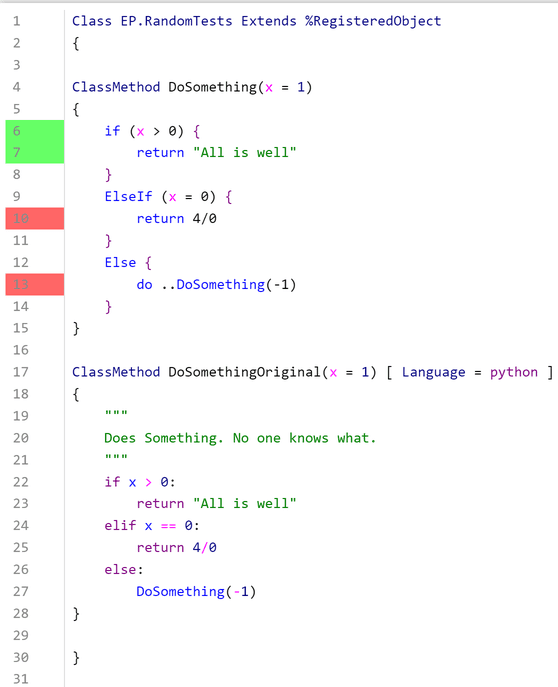
 

As more and more IRIS application code is being written in Embedded Python instead of just ObjectScript, it's critical that TestCoverage can include coverage results for Embedded Python code. Customers (through the TestCoverage GitHub issues) as well as others in InterSystems have expressed interest in seeing Embedded Python support.
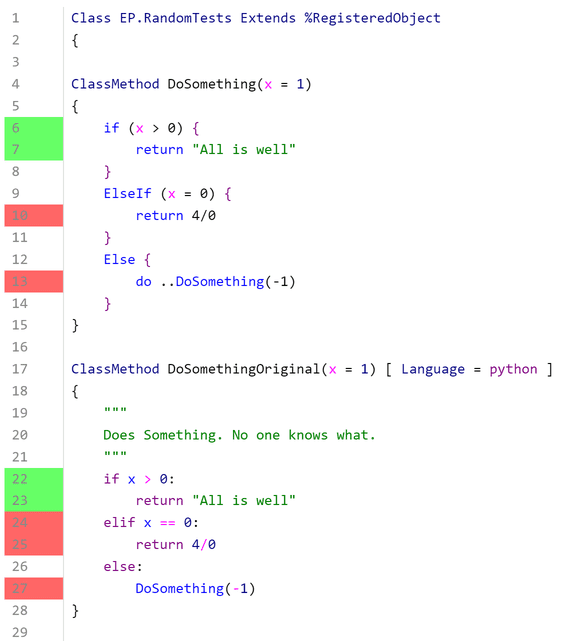
 

The user still installs and runs TestCoverage the same way as before, as described on the TestCoverage GitHub. The coverage results for Embedded Python code now get included in the aggregate coverage statistics as well as the individual line coloring, as displayed in the above example. 

Under the hood, the Embedded Python coverage is tracked using Python's sys.settrace tracer, independently of ObjectScript's %Monitor.System.LineByLine, and then the results are combined and displayed together. This can cause very minor discrepancies in which lines are marked as executable (i.e. can be run at all). For instance, in the above picture, Python considers the elif statement as executable, but ObjectScript does not consider the ElseIf statement as executable. At the end of the day, any line of code marked red was not covered, and any line of code marked as green was still covered; this just slightly affects which lines of code we ignore, which doesn't cause any problems. 

New TestCoverage UI 

The previous TestCoverage UI was an old Zen UI that didn't surface many of the useful statistics that TestCoverage tracks. In addition, TestCoverage could only be run from the command line. 

To solve these problems, we've created a new Angular UI building off of isc.perf.ui, the existing UI for interacting with the Line-By-Line Monitor (^%SYS.MONLBL). The web application comes with an accompanying REST API and WebSocket connection to retrieve data from the IRIS server. It also fixes the previous user authentication for isc.perf.ui, so that it now uses standard IRIS login/logout. This is also publicly available on the Open Exchange, under the name isc-perf-ui. Below are some of the new UI's features and uses. 

Installation

There are some additional steps for installing isc.perf.ui if you want to use the new TestCoverage features. On Windows only, you need to enable the IIS WebSocket protocol. On any OS, you need to give a specific user (usually CSPSystem) a resource permission (usually %DB_User) in the IRIS management portal. These steps are described on the isc-perf-ui GitHub page

Test Coverage Page

On the Test Coverage page, you can select the parameters that you want to run TestCoverage on your unit tests with.
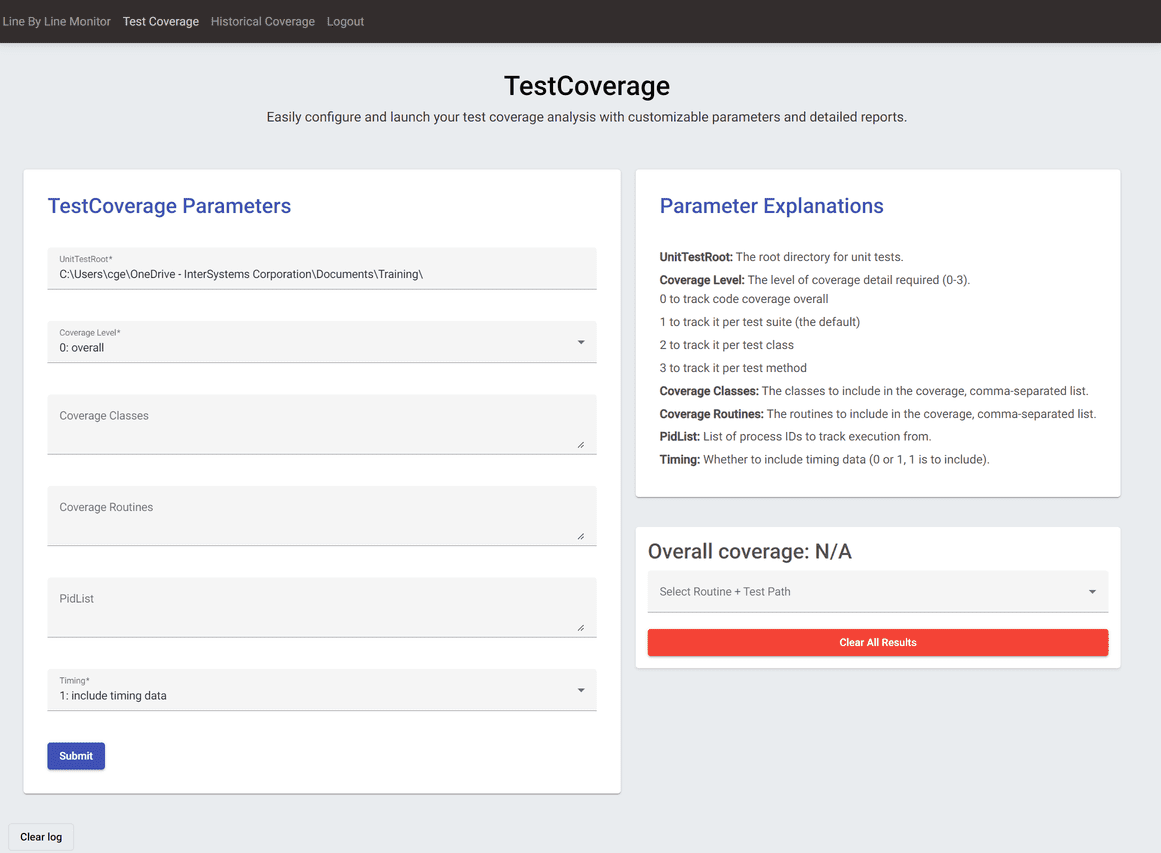
  

The parameter explanations include descriptions of what each of these parameters control. You can also click into an input box to see a sample value, and there's input validation to make sure that your inputs are in a valid format.

After you press submit, the call to run TestCoverage will begin, and you'll see live progress of your unit tests in the log at the bottom of the page. 
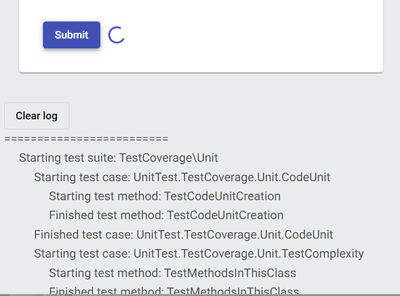
 

After the tests have finished running, the dropdown select menu on the right should open with a list of routine + test path combinations, as well as the overall coverage percentage for your code and the link to the results of the unit tests themselves.
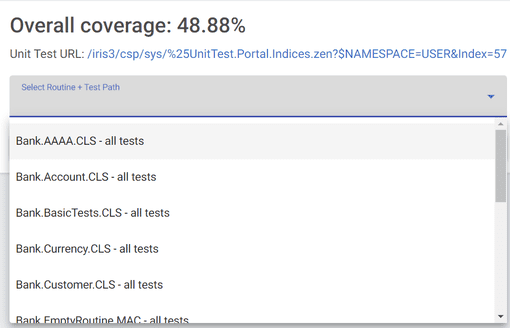
 

Click on any to be taken to the coverage results page for that routine under that unit test directory.

Here, you can see which lines of code were covered by your unit tests according to TestCoverage. There are also additional metrics like TotalTime, which tracks the amount of time the code spent on a certain line of code from its start to finish. 
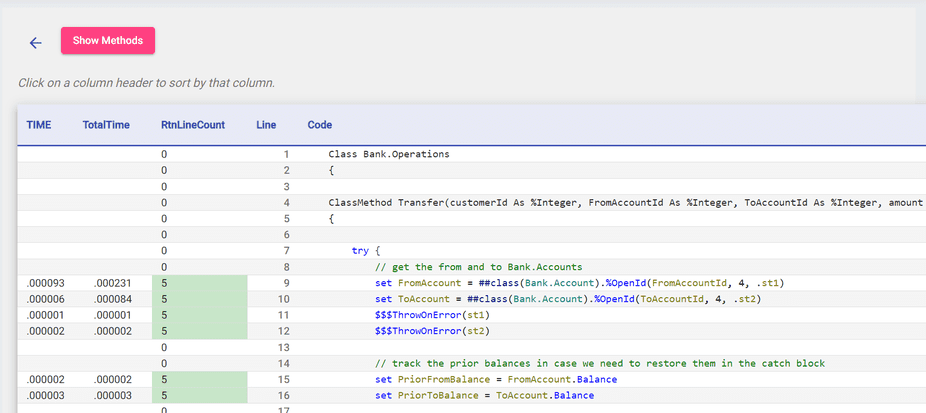
 

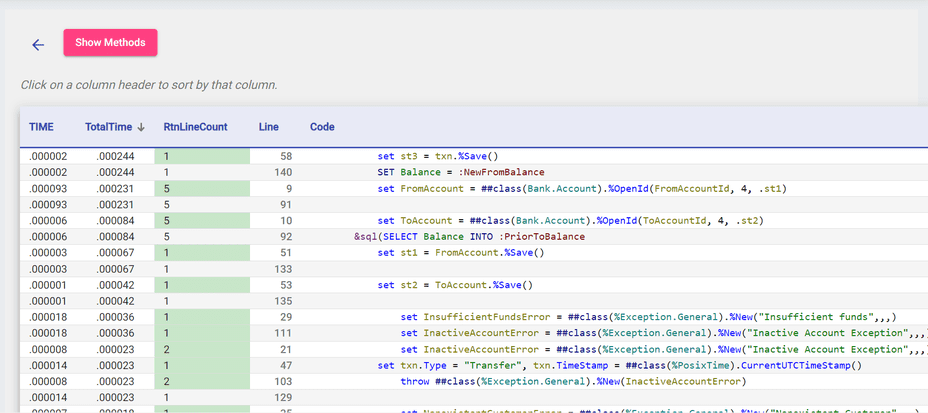
You can further sort in ascending or descending order by clicking on the arrows next to the headers; this is a useful way to see which lines of code take the longest. 
 

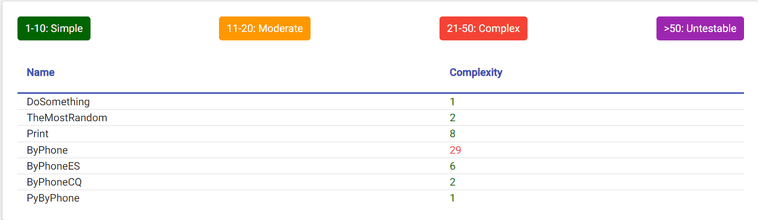
Finally, the Show Methods button opens up a table with the cyclomatic complexity of each of your methods, showing which methods are the most complex and vulnerable to bugs. 
 

When you're done, can click the back button to go back to the launcher page. The red clear results button lets you clear all your test coverage runs.
 

Historical Coverage Page

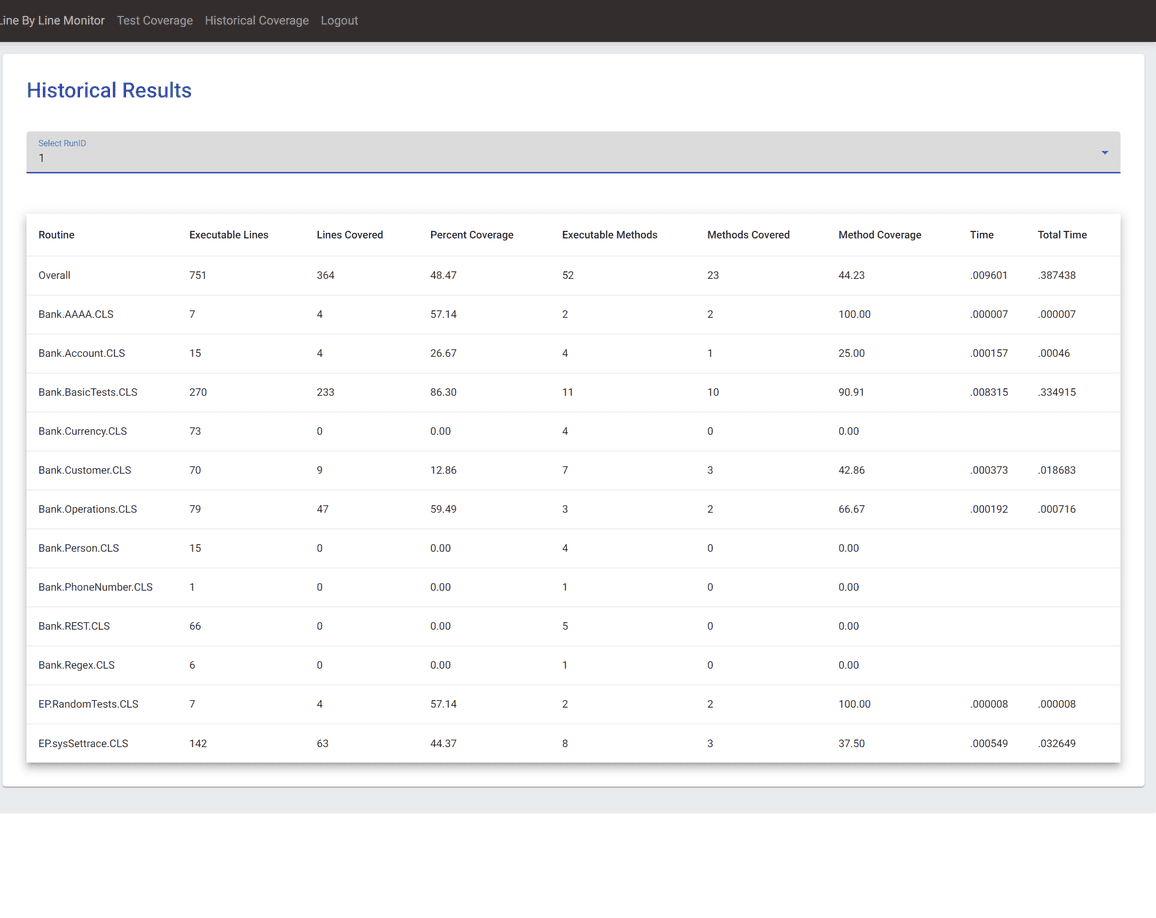
After clicking on a specific past Run ID, you can view the class-level coverage results (line coverage, method coverage, timing) for all the classes in that run. This is the same data as the main results page from TestCoverage. This table is also sortable by each column. 
 

Again, both tools are available on the InterSystems Open Exchange (isc-perf-ui and Test Coverage Tool) and on GitHub. Good testing to everyone! 


4 comentarios
Comentarios (4)3
Inicie sesión o regístrese para continuar
Pregunta
· 15 ago, 2024

There's any way to check if some part of the code is an abbreviated command?

Hello every one, here in our company we are trying to develop a tool to help us in our "Code Review" that today is completely done for another developer.

So I need to develope a tool that reads a class/routine (Already done) and identify if in the current line there is some abbreviated command, that is against our policy of codification, for example:

s variable = "test"
d ..SomeMethod()

So in this cases I want to warn the original developer that the code has parts that need to change the "s" to "Set" and de "d" to "Do".

I tried to found some library in the documentation but with no success, if there's any way to do It will help us a lot.


Thank all of you so much. 

6 comentarios
Comentarios (6)2
Inicie sesión o regístrese para continuar
Pregunta
· 12 ago, 2024

Error consultando foreign table en MySQL

¡Hola estimados miembros de la comunidad!

En esta ocasión no vengo con ningún artículo sino con un problema que me he encontrado al definir una conexión a una tabla ubicada en una base de datos externa en MySQL.

Estoy haciendo algunas pruebas con la funcionalidad de las Foreign Tables incluidas en IRIS que permite incluir tablas externas en modo consulta como si fueran propias de IRIS y he visto que funciona perfectamente con una tabla ubicada en PostgreSQL, el problema ha sido al intentar hacer lo mismo con una tabla de MySQL, he seguido los siguiente pasos como indica la documentación:

  • Paso 1: He creado la conexión a la base de datos de MySQL desde la configuración de SQL Gateway connection: **AVISO** si el nombre del fichero que contiene el driver es demasiado largo IRIS no podrá cargarlo.
  • Paso 2: He creado el Foreign Server:
    CREATE FOREIGN SERVER Test.MySQLDB FOREIGN DATA WRAPPER JDBC CONNECTION 'MySQL'
  • Paso 3: He creado la Foreign Table:
    CREATE FOREIGN TABLE Test.PatientMySQL SERVER Test.MySQLDB TABLE 'patient'
  • Paso 4: He lanzado al consulta a Test.PatientMySQL:
    SELECT * FROM Test.PatientMySQL

Y este ha sido el error:

[SQLCODE: <-230>:<Foreign table query Execute() failed>]

[%msg: <Foreign Tables - ERROR #8104: Gateway Exception: <GATEWAY> java.sql.SQLSyntaxErrorException com.mysql.cj.jdbc.exceptions.SQLError.createSQLException(SQLError.java:112) Remote database reported error: You have an error in your SQL syntax; check the manual that corresponds to your MySQL server version for the right syntax to use near '"patient" T1' at line 1>]

Como podéis ver, el problema son las dobles comillas que aparecen en el nombre de la tabla en la consulta que IRIS está ejecutando, MySQL es incapaz de reconocerlo y nos devuelve ese error. Por si acaso he revisado la versión de MySQL y el driver utilizado y ambas son la versión 9, así que no parece que sea eso.

¿Es un bug para MySQL? ¿He configurado algo erroneamente?

¡Gracias por adelantado!

1 Comentario
Comentarios (1)1
Inicie sesión o regístrese para continuar